Nostalgia: The Handwritten Font That Adds Charm to Every Craft
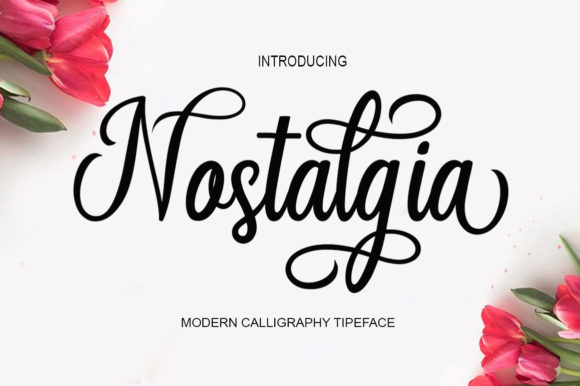
As a small shop owner who creates custom SVG designs and printable products, I’m always on the hunt for fonts that bring both personality and practicality to my work. That’s why I was thrilled to discover Nostalgia—a fresh, playful handwritten font that feels both modern and timeless. It’s the kind of typeface that instantly adds warmth and a personal touch, without sacrificing readability or commercial usability.
What sets Nostalgia apart is its carefree attitude and subtle whimsy. It’s not overly stylized like some script fonts can be, which makes it incredibly versatile for physical products. Whether I’m designing greeting cards, labels for handmade candles, or boutique-style clothing tags, this font always strikes the right balance between charm and clarity.
Perfect for Labels, Invitations, and More
I’ve used Nostalgia in a variety of projects—from wedding stationery to seasonal packaging—and it never fails to elevate the design. Its natural-looking ligatures give it a more authentic, handwritten feel, which is especially important when creating invitations or personalized gifts. For example, when designing a welcome board for a rustic wedding, I used Nostalgia for the couple’s names and event title. The font’s soft curves and casual elegance matched the theme perfectly and drew compliments from the bride and groom.
It’s also ideal for product labels. I recently created a line of natural soy candles and used Nostalgia for the scent names and ingredient tags. The font’s legibility at smaller sizes made it easy to read on tiny stickers, and its friendly tone aligned with the brand’s organic, handmade image.
Emotional Appeal Meets Practical Design
As a crafter, I know that the right font can do more than just look good—it can influence how customers perceive your brand. Nostalgia has a softness that feels approachable and genuine, which helps build trust and emotional connection with buyers. When I used it on a set of printable wall art for a nursery, the font gave the designs a comforting, handmade vibe that customers loved.
It also plays well in brand consistency. Once I started using Nostalgia across my product line—from digital downloads to physical packaging—it helped unify the look and feel of my shop. Customers began to recognize my style, which strengthened my brand identity and made my offerings more memorable.
Best Used for Short, Impactful Text
Nostalgia shines brightest when used for short phrases, titles, names, and decorative text. It’s not ideal for long paragraphs, but that’s exactly what makes it perfect for display use. I often pair it with a clean sans serif font for contrast, especially when creating planner pages or digital printables. The combination gives the design a balanced, modern look while keeping the focus on key elements like headings and callouts.
One of my favorite uses has been on seasonal product packaging. During the holidays, I designed a series of gift tags and wrapping labels using Nostalgia for the names and “To/From” sections. Paired with a bold serif font for the main message, it gave the packaging a polished, boutique-style finish that customers loved.
Readability Tips for Crafters and Makers
If you’re using Nostalgia with cutting machines like Cricut or Silhouette, I recommend previewing your text in the software before cutting. The font’s ligatures and swashes can sometimes interfere with intricate cuts, especially at smaller sizes. I’ve found that keeping the text size above 20pt ensures cleaner lines and better readability on physical products like stickers and tags.
For printed cards or invitations, always check how the font appears in different weights and sizes. I once designed a set of thank-you cards using a lighter version of Nostalgia, and the result was too faint when printed. Switching to the regular weight gave the text the clarity it needed without losing the font’s signature charm.
Font Pairing Ideas for Creative Projects
One of the joys of working with Nostalgia is how well it pairs with other fonts. I often combine it with a crisp sans serif like Montserrat or Lato for digital product descriptions or social media graphics. The contrast between the playful script and the clean modern typeface creates a dynamic visual hierarchy that guides the viewer’s eye naturally.
For more rustic or vintage-inspired designs, I’ll pair Nostalgia with a distressed serif font for a layered, handcrafted look. This works especially well for farmhouse-style signs or boutique tags. If I’m designing a logo or product packaging, I might use a bold display font for the main title and Nostalgia for the tagline or supporting text to add a personal touch.
What’s Included in the Nostalgia Font Family
When I first downloaded Nostalgia, I was impressed by the variety of alternates and ligatures included. The font comes with a wide selection of natural-looking ligatures that make each line feel more organic and less repetitive. I’ve used these to create custom SVG quotes and greeting cards that feel truly one-of-a-kind.
It also supports multiple file formats, including OTF and TTF, which makes it compatible with most design software and cutting machines. Multilingual support is another bonus—especially for sellers who create international products or serve a global audience.
Commercial Use Made Easy
One of the most important considerations for Etsy sellers and printable creators is licensing. I was relieved to find that Nostalgia includes a commercial license, which means I can use it in physical products, digital downloads, SVG designs, and client work without any additional fees or restrictions. This has saved me time and money, and gives me peace of mind knowing my designs are legally protected.
Whether you’re creating mugs, tote bags, wall art, or digital planners, Nostalgia is a reliable, rights-cleared asset that enhances your creative toolkit. Just be sure to double-check the specific license terms to ensure it covers your intended use, especially if you’re reselling templates or design bundles.